Integrate USP Using API
Who is this for: Developers who want complete control over the User Selected Perks experience and prefer to build a fully custom UI using the API.
Outcome: Implement USP via the MomentPerks API by managing offer retrieval, session IDs, user selections, and tracking without relying on the SDK.
Overview
If you want full control over how offers are displayed, selected, and submitted within your app or website, you can build a fully custom integration using the USP APIs. This approach lets you design your own user interface while using our backend for session management, offer selection, and tracking.
Prerequisites
- You have an active MomentPerks integration using the API.
Integration Steps
Step 1: Retrieve Offers Using the MomentPerks API
User Selected Perks (USP) is built on top of the MomentPerks API. To enable USP, your integration must call the API to retrieve eligible offers for a given user.
Each request to the MomentPerks API must include a pub_user_idin the request body:
- A unique, non-PII identifier representing the end user.
- Used to associate offer sessions and selections with a specific user.
- Must remain consistent across user sessions and devices.
- Can be the same value as adpx_fp, if available.
You can generate the pub_user_idusing any method that ensures uniqueness (e.g., a UUID stored in localStorage or server-side user ID).
Example API Response
A successful response will return a session_id in the body:
- The session_idis a unique identifier for the user's active offer session.
- It must be stored and reused for any subsequent offer selection, unselection, or session state operations.
- It is tied directly to the pub_user_idyou provided.
{
  "data": {
    "session_id": "abc123456789",
    // other parameters...
  }
}
Step 2: : Build Your UI
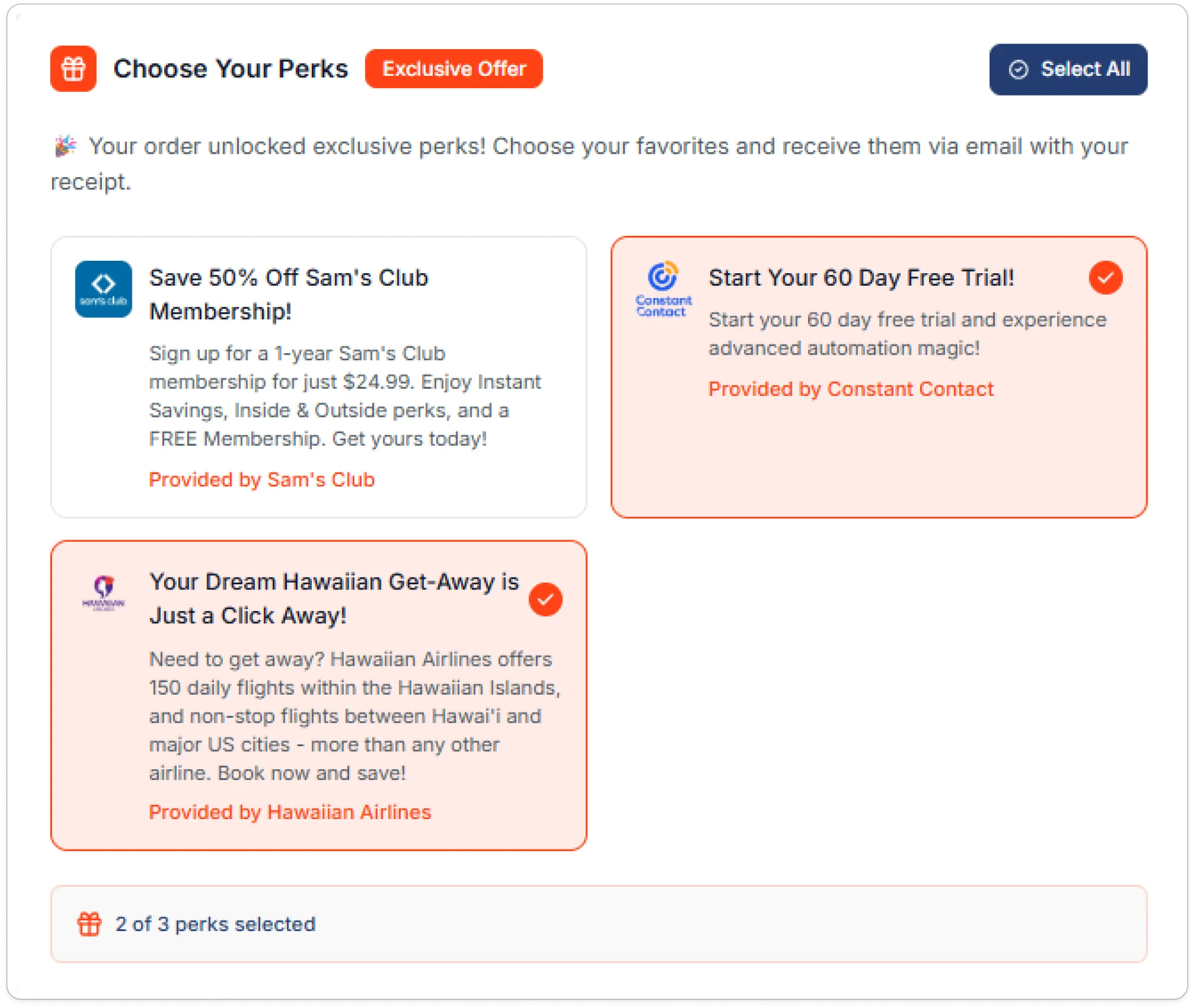
With the offer data returned from the MomentPerks API, you can build a fully customized User Selected Perks (USP) interface tailored to your brand and user experience.
The UI should allow users to:
- View available offers including titles, descriptions, images, and reward values
- Select or deselect individual offers
- Bulk-select or unselect all offers at once for convenience
This interface acts as the primary point of interaction for users to curate their perks before checkout or a major app flow.
To help users understand the value of selecting offers, we recommend adding a short introduction above the offer unit. For example:
💡 Choose the perks you’re interested in before completing your purchase. You’ll earn rewards by engaging with these personalized offers.
Step 3: Handle User Interactions
Once the offer selection UI is in place, you need to track and communicate user interactions, such as selecting or unselecting offers, by calling the appropriate MomentPerks endpoints.
All USP API endpoints use the following base URL:
https://api.adspostx.comSelect Offer API
Use this endpoint when a user selects an individual offer to indicate interest. This must be called for each individual offer selection as part of the User Selected Perks (USP) flow.
- HTTP Method: POST
POST https://api.adspostx.com/sdk/v4/usp/{{session_id}}/{{campaign_id}}/select.jsonReplace:
- {{session_id}} with the session ID returned by the MomentPerks API
- {{campaign_id}} with the ID of the selected offer's campaign
Headers:
Header | Value | Required |
|---|---|---|
Authorization | Bearer {{API_KEY}} | Yes |
Content-Type | application/json | Yes |
Request Body
Field | Type | Required | Description |
|---|---|---|---|
pub_user_id | String | Yes | Unique, non-PII identifier for the end user. Must be consistent across sessions. |
Example cURL Request
curl -X POST \
  "https://api.adspostx.com/sdk/v4/usp/{{session_id}}/{{campaign_id}}/select.json" \
  -H "Content-Type: application/json" \
  -H "Authorization: Bearer {{API_KEY}}" \
  -d '{
    "pub_user_id": "your_pub_user_id"
  }'
Response Fields
Field | Type | Description |
|---|---|---|
session_id | String | The current session ID tied to the user |
campaign_id | Number | The campaign ID of the offer that was selected |
Unselect Offer API
Use this endpoint when a user unselects a previously selected offer. This must be called for each individual offer unselection as part of the User Selected Perks (USP) flow.
Endpoint
- HTTP Method: POST
POST https://api.adspostx.com/sdk/v4/usp/{{session_id}}/{{campaign_id}}/unselect.jsonReplace:
- {{session_id}} with the session ID returned by the MomentPerks API
- {{campaign_id}} with the ID of the offer's campaign that the user is unselecting
Headers
Header | Value | Required |
|---|---|---|
Authorization | Bearer {{API_KEY}} | Yes |
Content-Type | application/json | Yes |
Request Body
Field | Type | Required | Description |
|---|---|---|---|
pub_user_id | String | Yes | Unique, non-PII identifier for the end user. Must be consistent across sessions. |
curl -X POST \
  "https://api.adspostx.com/sdk/v4/usp/{{session_id}}/{{campaign_id}}/unselect.json" \
  -H "Content-Type: application/json" \
  -H "Authorization: Bearer {{API_KEY}}" \
  -d '{
    "pub_user_id": "your_pub_user_id"
  }'
Response Fields
Field | Type | Description |
|---|---|---|
session_id | String | The current session ID tied to the user |
campaign_id | Number | The campaign ID of the offer that was unselected |
Bulk Update Offers API
Use this endpoint to select and unselect several offers in one call, for example for a Select All or Unselect All action in the User Selected Perks (USP) flow.
- HTTP Method: PUT
PUT https://api.adspostx.com/sdk/v4/usp/session/{{session_id}}.json?pub_user_id={{pub_user_id}}Replace:
- {{session_id}} with the session ID returned by the MomentPerks API, and {{pub_user_id}} with the same ID you used when fetching offers
Headers
Header | Value | Required |
|---|---|---|
Authorization | Bearer {{API_KEY}} | Yes |
Content-Type | application/json | Yes |
Request Body
{
  "selected": [849, 850],
  "unselected": [851]
}
Field | Type | Required | Description |
|---|---|---|---|
pub_user_id (query) | String | Yes | Unique, non-PII identifier for the end user. Send it as the pub_user_id query parameter, not in the body. Must match the ID used when fetching offers. |
selected | Array | Yes | Campaign IDs to mark as selected. Send an empty array if there are none. |
unselected | Array | Yes | Campaign IDs to mark as unselected. Send an empty array if there are none. If an ID appears in both arrays, it stays selected. |
curl -X PUT \
  "https://api.adspostx.com/sdk/v4/usp/session/{{session_id}}.json?pub_user_id=user_123456" \
  -H "Content-Type: application/json" \
  -H "Authorization: Bearer {{API_KEY}}" \
  -d '{
    "selected": [849, 850],
    "unselected": [851]
  }'
Step 5: Retrieve Current Session State
Use this endpoint to fetch the current state of a USP session, including:
- Active session metadata
- Available campaigns in the session
- Currently selected campaign IDs
This is useful for resuming sessions, pre-selecting previously chosen offers, or syncing UI state across devices.
Use Cases
Scenario | Why to Call This Endpoint |
|---|---|
Resume session on app relaunch | Show previously selected offers and campaign list after a user returns |
Sync across devices | Restore selection state if the user switches from mobile to desktop |
Prepopulate selection UI | Populate your offer selection UI with current selection from backend |
QA / Debugging | Inspect current session state and selections for debugging or QA |
Get Session State Endpoint
Use this endpoint to fetch session details, selected offers, and metadata.
- HTTP Method: GET
GET https://api.adspostx.com/sdk/v4/usp/session/{{session_id}}.json?pub_user_id={{pub_user_id}}Replace:
- {{session_id}} with the active session ID
- {{pub_user_id}} with the unique user ID from your system
Headers
Header | Value | Required |
|---|---|---|
Authorization | Bearer {{API_KEY}} | Yes |
Example cURL Request
curl -X GET \
  "https://api.adspostx.com/sdk/v4/usp/session/{{session_id}}.json?pub_user_id={{pub_user_id}}" \
  -H "Authorization: Bearer {{API_KEY}}"
Key Response Fields
Field | Type | Description |
|---|---|---|
session_id | string | Unique session identifier |
pub_user_id | string | Your platform's user ID |
campaigns[] | array | Campaigns in the session |
campaign_id | int | Unique ID for each campaign |
title, cta_yes, cta_no | string | Text for UI display |
image | string | Primary image URL |
selected[] | array | IDs of currently selected campaigns |
sequence[] | array | Campaign display order |
sdk_payload.dev | boolean | Indicates sandbox vs. production mode |
device, os, browser | string | Basic user agent fingerprinting |
_location.city/country | string | Detected geo-location from IP |
You can use the selected[] array to:
- Mark offers as already selected in your UI
- Enable a "Bulk Unselect" button if selected.length > 0
- Enable a "Bulk Select All" using the IDs in campaigns[].campaign_id
Step 6: Complete the Session
Once your user has reviewed and selected their desired offers, and completed their primary action (such as checkout or form submission), you must notify MomentScience that the USP (User Selected Perks) session is complete.
Complete Session API
- HTTP Method: POST
POST https://api.adspostx.com/sdk/v4/usp/session/{session_id}.jsonReplace:
- {session_id} with the active session ID received during initialization.
Payload Parameters:
Parameter | Type | Required | Description |
|---|---|---|---|
pub_user_id | String | Yes | Your internal user ID (should match session init) |
curl -X POST "https://api.adspostx.com/sdk/v4/usp/session/d48734cd9d465f3285c8e38c917de44b7b6729d8.json" \
  -H "Authorization: Bearer b9a3935-a222-4bdd-bf6-a63XXX1e39" \
  -H "Content-Type: application/json" \
  -d '{
  "pub_user_id": "MomentScience_USP_Demo"
}'- Always complete the session after the user’s final decision to ensure selected offers are saved. This call returns an error unless MomentScience has enabled User Selected Perks on your account. You can add a USP webhook URL only after User Selected Perks is enabled. Completing the session sends the selected offers to your USP webhook, if one is configured. The webhook is sent once and is not retried.
- You can inspect the selected array in the response to confirm which offers were logged.
- Ensure you’re using the same pub_user_id used in the session initialization step.
📢 If you're running into any issues while going through the integration process, feel free to contact us at help@momentscience.com